
Why can’t I connect with a working VPN profile using WireGuard?
When you are sure that all settings/IPs/keys are correct, check the log!
Maybe you’re bumping into the same problem as mine!
Solutions:
Check your log; if you saw something like the following, you should try the steps below:
“[TUN] [XXXXXX-Wireguard-XXXXXX] Warning: the “Ethernet” (or the name of your internet interface that is having issues) interface has Forwarding/WeakHostSend enabled, which will cause routing loops”
E.g. [TUN] [XXXXXX-Wireguard-XXXXXX] Warning: the “乙太網路” interface has Forwarding/WeakHostSend enabled, which will cause routing loops
1. Open PowerShell as administrator.
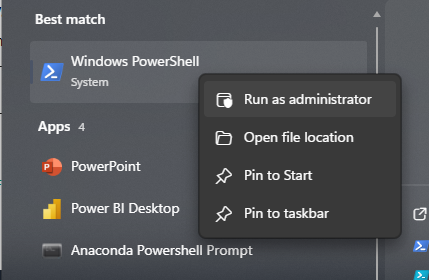
2. Search for the index of the interface (ifIndex):
Get-NetIPInterface | Select-Object ifIndex, InterfaceAlias, Forwarding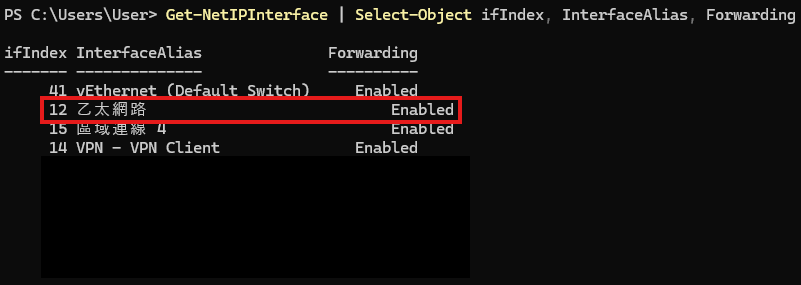
3. Find your internet interface that was mentioned in the WireGuard log. For me it was “乙太網路”. Copy the ifIndex.
4. Next paste and execute the following command. Remember to replace “<ifIndex>” with your actual ifIndex; in my case, it was 12.
Set-NetIPInterface -ifindex <ifIndex> -Forwarding Disabled5. Restart WireGuard and VOILA!!!