Ever wonder if you want to selectively download certain files/folders from a huggingface data repo, how you could do it in a simple and efficient way?
Let’s dive in!
So some time Hugging face dataset repo might be too large to be downloaded, or simply you just don’t need all the files in that repo. GIt-clone is fast but you would fetch the whole repo, and downloading manually file by file is just hideous (plus, for folders there is no download button on the webpage!). So, this is how you do it:
1. Open up powershell and install the Huggging Face CLI package:
pip install -U "huggingface_hub[cli]"2. Time to construct your download command!
I will use my case as an example; feel free to edit the command according to your own requirements!
I want to download the 2 folders, “daily_aligned” and “daily_aligned_multi”, like the repo below.
3. So my command would be:
hf download TimeSeventeen/Polymarket-v1 --include "daily_aligned/" --include "daily_aligned_multi/" --local-dir "D:\Polymarket data\Polymarket_v1" --repo-type dataset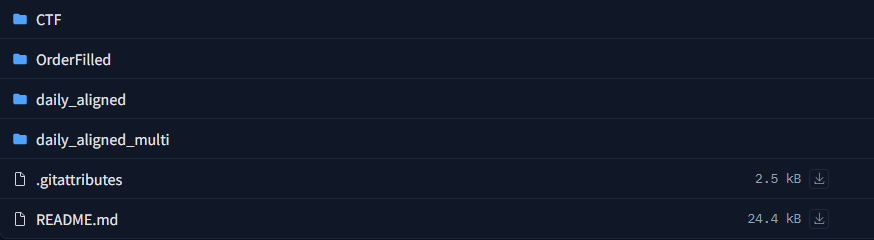
Command components:
hf download [username/dataset_name] : copy the repo ID and place it here for the [username/dataset_name] part.
--include "daily_aligned/" : Add the inclusion of the file/folder that you would like to download with the command. You can add multiple if needed, and you can also add “–exclusion” in the same logic to exclude file/folder for download.
--local-dir "D:\Polymarket data\Polymarket_v1" : Define where to save the files on your local machine. A neat trick is to just use “” to wrap around your windows route, in this way you can prevent lots of errors related to the route formats etc.
To find out more, visit the huggingface CLI documentation!
Source: https://huggingface.co/docs/huggingface_hub/guides/cli
